// Software // Atari ST
EUpdate
The latest releases of GitHub repositories, straight to the Atari Falcon and TT: a GEM program that finds repositories on GitHub, follows the ones you choose into folders of your choice, and updates them with a click or on a schedule.

- TT
- Falcon
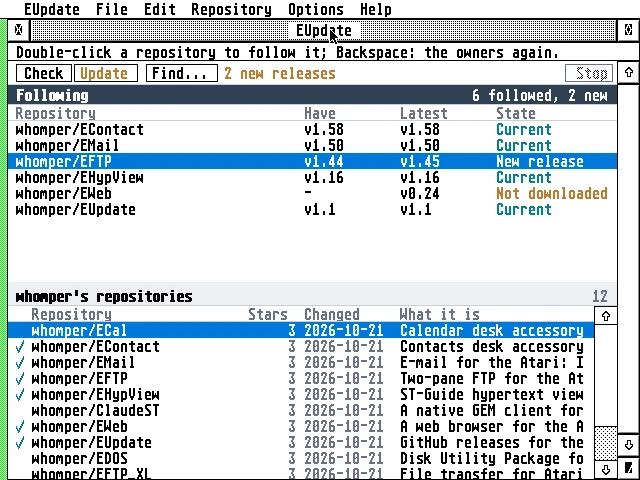
The EUpdate window on a Falcon: six followed repositories above (EContact, EMail, EHypView and EUpdate current in teal, EFTP with a new release, v1.44 to v1.45, and EWeb not downloaded, both in orange), and whomper’s repositories below, ticked where followed.
Latest release v2.0311 Nov 2026eupdate-2.03.zipFree, GPL v2
The latest releases of GitHub repositories, straight to the Atari Falcon and TT, with the TLS done on the Atari itself.
The Story
EUpdate finds repositories on GitHub, by name or by owner, and follows the ones you choose into folders of your choice. It shows at a glance whether you are current, and updates one, several or all with a click, or on a schedule. On its first start it follows the AERA programs, each into C:\AERA\.
Every file goes where it belongs: zips are unpacked, accessories go to C:\, names are made 8+3 and files are written safely. The Atari talks to GitHub itself, TLS 1.2 with the handshake on the Falcon’s DSP, with no gateway.
How it connects
Getting started
- Copy the files into a folder of their own; EUpdate keeps its settings there.
- Load STinG, or run MiNT with MiNTnet.
- Start EUpdate: Check (^R), then Update (^D). Help opens the guide.
- The guide has the tips:
FOLDR100.PRGunder TOS, STinG’s Delay, and a GitHub token for more than 60 questions an hour.
Highlights
- The AERA programs, ready to follow on its first start, each into
C:\AERA\. - Find on GitHub: repositories by name, or owners and then their repositories.
- Follow a repository into a folder and see at a glance whether you are current.
- Update one, several or all with a click, or on a schedule.
- Every file where it belongs: zips unpacked, accessories to
C:\, 8+3 names, safe writes. - TLS on the Atari itself, the handshake on the Falcon’s DSP; no gateway.
- A GitHub token is optional and kept encrypted; it goes only to GitHub’s API.
- Light: about 220 KB, and 140 KB of
tls.ovlloaded when it first talks to GitHub.
Requirements
- A Falcon or TT
- TOS 3 or 4, EmuTOS, MagiC or MiNT
- 640 by 400 or larger
- About 500 KB free, and room for the biggest download
- STinG or MiNTnet
In the download
| eupdate.prg | the program (68030) |
| tls.ovl | its TLS, the AERA family’s: needed to reach GitHub |
| cacert.pem, roots.dat | the root certificates |
| eupdate.hyp | the user guide; the Help key opens it |
| defaults.inf | what it follows on its first start: the AERA programs |
| icons/ | the desktop icon (eupdnv.rsc, renamed, under NVDI’s own palette) |
Credits
- Written by AERA | Erez Yaary
- Free software under the GNU GPL, version 2 or later
- TLS by BearSSL (Thomas Pornin, MIT licence); root certificates from Mozilla (MPL 2.0)
- The icon’s mark: the Git logo by Jason Long (CC BY 3.0)
- GitHub is a trademark of GitHub, Inc.; EUpdate is not affiliated with it
// Works with