
// Software // Atari ST
EHypView
A hypertext viewer for the Atari ST, STE, TT and Falcon: EHypView reads and searches .HYP hypertexts, the help that Atari programs come with.

- ST
- STE
- TT
- Falcon
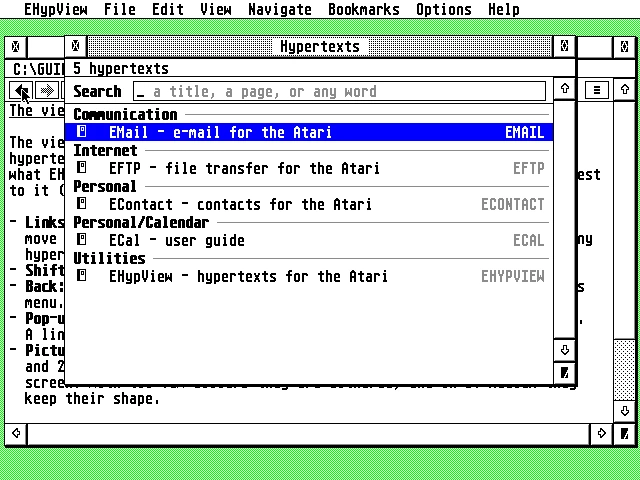
The library over the viewer: five hypertexts grouped by subject, the guides of EMail, EFTP, EContact, ECal and EHypView, under one search field.
Latest release v1.2022 Oct 2026EHYPVIEW-1.20.zipFree, GPL v2
Every hypertext on your drives, found by itself, searched from one box, and opened when any program asks for help.
The Story
EHypView reads the .HYP hypertexts that Atari programs come with. It runs as a program with a menu bar or as a desk accessory, and installed as ST-GUIDE.ACC it is the viewer other programs open when you press Help. Pages show as they were written, with styled text, links, lines, boxes and pictures, in colour wherever the screen has it.
It finds the hypertexts by itself: the folders named in ST-GUIDE.INF or in its own Settings, and \GUIDES and \GEMSYS\GUIDES on every drive, scanned in the background and kept in an index, so there is no ALL.REF to maintain. The library lists them by subject under one search box, which finds page names as you type and searches the full text of every page on Return.
Getting started
- Copy
EHYPVIEW.PRGinto any folder and start it. It keeps its index (EHYPVIEW.IDX), its list of fonts (EHYPVIEW.FNT) and anyCRASH.LOGnext to itself, so a folder of its own (such asC:\EHYPVIEW\) keeps them together; its settings,EHYPVIEW.INF, go in the root of the boot drive. It opens the hypertext given on its command line, elseDEFHYP(orHYPTOP) from theST-GUIDE.INFin your boot drive’s root, else the library. To open a.HYPwith a double-click, installEHYPVIEW.PRGin your desktop as the application forHYPfiles. - To have EHypView inside every program, copy
EHYPVIEW.ACCto the root of your boot drive and restart. To be the help viewer for every program, copy it there asST-GUIDE.ACCinstead (in place of any accessory with that name): that is the name programs look for when you press Help. - Keep your hypertexts (each
.HYPwith its.REF) where EHypView looks for them, including all subfolders: the folders you add in Options > Settings… (PATHSinEHYPVIEW.INF); the folders inPATHSandHYPFOLD, and the folder ofREF, fromST-GUIDE.INF; and\GUIDESand\GEMSYS\GUIDESon every drive from C: on. CopyEHYPVIEW.HYPandEHYPVIEW.REFinto one of them too (or next toEHYPVIEW.PRG): Help > EHypView guide opens it. EHypView looks through these folders in the background and keeps an index, so only new or changed files are read again. - Press ^L for the library, Help for the hypertext’s help page (in the library, EHypView’s guide), ^, for the settings, and the right mouse button for a menu.
Highlights
- Finds every hypertext by itself: the folders in ST-GUIDE.INF or its Settings, and \GUIDES on every drive, kept in an index.
- A library with one search box: page names as you type, the full text of every page on Return.
- Links that lead somewhere, into any hypertext in the index; one that leads nowhere suggests the closest names.
- Help for your other programs: installed as ST-GUIDE.ACC, it answers every program’s Help key.
- Pages as they were written: pictures and coloured text in every screen mode, from mono to true colour.
- A toolbar with back and forward, contents, index, see also, the library and bookmarks.
- Several windows and bookmarks: up to six windows, and pages kept to come back to.
- Modern but Atari: menu bar or desk accessory, right-click menu, drag and drop, clipboard and iconify.
Requirements
- Any ST, STE, TT or Falcon, with 1 MB or more
- TOS, EmuTOS, MagiC or MiNT (MultiTOS, XaAES, N.AES)
- A screen 640 pixels wide or more
- Optional: NVDI, SpeedoGDOS or another GDOS, for more fonts
In the download
| EHYPVIEW.PRG | the viewer as a program, with a menu bar |
| EHYPVIEW.ACC | the same viewer as a desk accessory (one program under two names) |
| EHYPVIEW.HYP, EHYPVIEW.REF | the user guide, and its index for ST-Guide |
| EHYPVIEW.RSC, EHYPVIEW.ICN, EHYPVWMK.ICN | the desktop icon, in the zip’s icons/ folder |
Credits
- Written by AERA | Erez Yaary
- Free software under the GNU GPL, version 2 or later
- Test files compiled with HypView’s hcp, used as an external tool only; no HypView code included
- Tested on hardware: Atari 1040 ST (4 MB) and Falcon030 with DFB1
- Tested in emulation: ST (1 MB and 4 MB), TT030 and Falcon030, with TOS 1.04, 3.06, 4.04 and EmuTOS
// Works with