
// Software // Atari ST
An e-mail program for the Atari ST, STE, TT and Falcon, written in C for GEM.
- ST
- STE
- TT
- Falcon
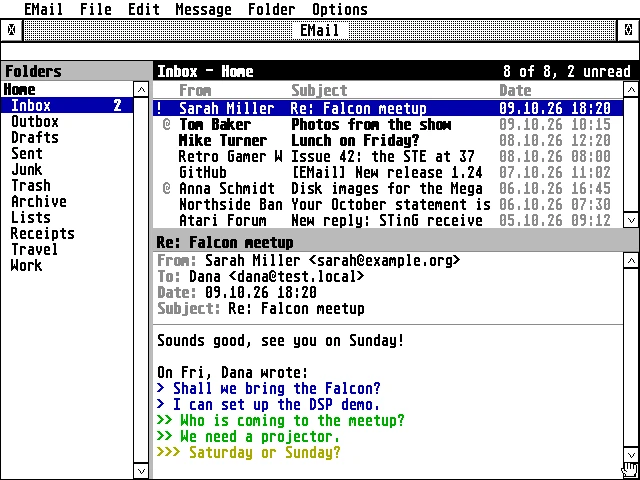
The window: the folders on the left, the Home account’s inbox with 8 messages, 2 unread, and a reply about a Falcon meetup with its quoted lines in blue, green and yellow.
Latest release v1.5122 Oct 2026EMAIL-1.51.zipFree, GPL v2
IMAP, POP3 and SMTP on any Atari from a 68000 ST to a Falcon, with TLS done by the Falcon itself or by a Raspberry Pi.
The Story
EMail is a GEM mail program with IMAP and POP3 for incoming mail and SMTP for sending, an Outbox for later and copies in Sent. It keeps a mirror of your folders and the messages you have read on disk, so you can read, flag and move mail offline and let the server catch up later. People’s names come from EContact, and Ctrl+B picks them in its window.
Most providers want encrypted connections, and EMail reaches them two ways. Any Atari can go through a Raspberry Pi gateway on the home network; a Falcon or TT with 4 MB or more can do TLS 1.2 itself, with the DSP56001 checking the servers’ RSA signatures. The DSP brings a handshake on a stock 16 MHz Falcon from about 9.6 seconds to about 2.5. Hebrew mail is shown right to left, in UTF-8, ISO-8859-8 or windows-1255.
How it connects
plain
Getting started
- Copy
EMAIL.PRGto any folder on any drive, withEMAIL.HYPandEMAIL.REFbeside it. EMail keeps its settings and your mail next to itself, so a folder of its own (C:\EMAIL\, say) keeps them together; nothing has to be in a particular place. - Set up the AERA Gateway on a Raspberry Pi with your provider’s servers:
git clone https://github.com/whomper/AERA-Gateway,cd AERA-Gateway,./update-pi.sh, thensudo gateway/aera-gateway install mail imap.gmail.com smtp.gmail.com(iCloud:imap.mail.me.com smtp.mail.me.com:587)../update-pi.shthere keeps it up to date. - Start EMail and fill in your account: the Pi’s IP address (
aera-gatewayprints it), ports 143 (IMAP) and 587 (SMTP), and your login (Gmail, iCloud, Yahoo and Fastmail need an app password). - Press Help in EMail for the user guide; it describes everything else.
Highlights
- IMAP and POP3 in, SMTP out, with an Outbox for sending later and copies in Sent.
- Secure, two ways: a Raspberry Pi gateway for any Atari, or Falcon mode, with TLS 1.2 and RSA on the DSP.
- Hebrew UTF-8, ISO-8859-8 and windows-1255 mail, right to left, the Israeli keyboard on F10.
- Works offline: read, flag and move from a mirror on disk; the server catches up later.
- Fast checks: the Inbox fetched and every other folder asked for its counts in one go.
- Many messages at once: mark them read or unread, flag, move or delete them together.
- Folders: create, rename and delete, with an alphabetical folder picker.
- Any Atari, from a 68000 ST in medium resolution to a Falcon in 640 by 480, in TT RAM when there is some.
Requirements
- TOS 1.04 or newer (TOS 4 on the Falcon), EmuTOS, MagiC or MiNT
- 640 by 200 (ST medium) or larger
- 1 MB of memory; EMail itself takes about 410 KB
- STinG (or STiK), MiNTnet or MagiC-Net
- For encrypted servers: a Raspberry Pi running the AERA Gateway, or Falcon mode on a Falcon or TT with 4 MB or more
In the download
| EMAIL.PRG | the program, for every Atari from the ST to the Falcon |
| CACERT.PEM, ROOTS.DAT | the root certificates for Falcon mode: Mozilla’s list, and the same decoded ahead of time |
| EMAIL.HYP, EMAIL.REF | the guide, for EHypView or ST-Guide, opened by the Help key |
| icons/ | EMail’s desktop icon |
Credits
- Written by AERA | Erez Yaary
- Free software under the GNU GPL, version 2 or later
- TLS by BearSSL (Thomas Pornin, MIT licence)
- Follows the design of Troll, the GFA-BASIC mail client by Rajah Lone
- Tested on hardware: Atari 1040 ST (4 MB) and Falcon030 with DFB1
- Tested in emulation: ST (1 MB and 4 MB), TT030 and Falcon030, with TOS 1.04, 3.06, 4.04 and EmuTOS
// Works with