// Software // Atari ST
EContact
An address book for the Atari ST, STE, TT and Falcon, written in C for GEM, that syncs with iCloud and other CardDAV servers.

- ST
- STE
- TT
- Falcon
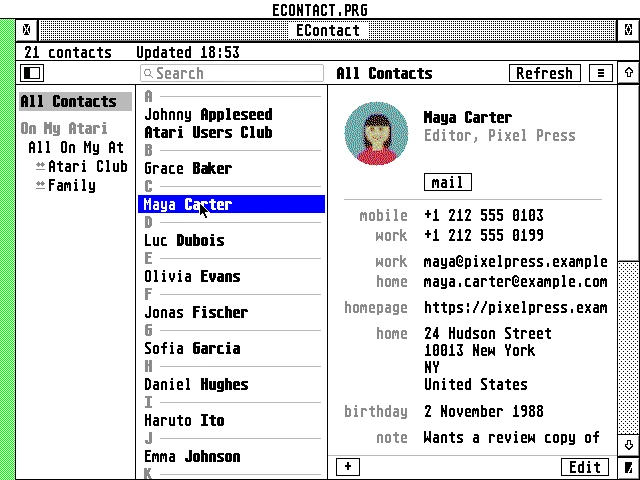
The window: the address books and groups on the left, 21 contacts sorted by last name under letter headings, Maya Carter chosen in a blue bar, and her card with her colour photo, phones, emails, home page, address, birthday and note.
Latest release v1.6022 Oct 2026ECONTACT-1.60.zipFree, GPL v2
An address book laid out like the Mac’s Contacts, synced both ways with iCloud and CardDAV, in the Desk menu of an Atari.
The Story
EContact opens from the Desk menu over whatever program you are in, or runs as a program. It keeps iCloud and other CardDAV address books in step both ways, fetching only what changed, with On My Atari address books beside them. Contacts’ photos are fetched when a card is opened and dithered to the screen you have, in colour on a Falcon or TT and in black and white on an ST.
It is also the address book of EMail and ECal: they ask it for names with the family’s PEOPLE message, and pick people or a group in its window. A Falcon or TT makes its own TLS 1.2 connections, with the DSP doing the RSA and elliptic curve sums; an ST or STE goes through the same Raspberry Pi gateway as ECal. Hebrew names and notes run right to left throughout.
How it connects
plain HTTP
Getting started
- Copy
ECONTACT.ACC(Falcon, TT) orECONTST.ACC(ST, STE; renamed toECONTACT.ACCor not) to the root of your boot drive, e.g.C:\: TOS loads accessories only from there. - Choose a folder for EContact, anywhere on any drive, and put the rest in it:
CACERT.PEMandROOTS.DATfor Falcon mode,ECONTACT.HYPandECONTACT.REFfor the Help key, andECONTACT.PRGif you want the program. EContact keeps its address books there too. StartECONTACT.PRGfrom the folder once, or the first time you open the accessory, choose Locate… (pick any file in the folder) or Use C:, which makesC:\ECONTACTfor you. - For an ST or STE (or a Falcon or TT without Falcon mode), set up the AERA Gateway on a Raspberry Pi:
git clone https://github.com/whomper/AERA-Gateway,cd AERA-Gateway,./update-pi.sh, thensudo gateway/aera-gateway install dav../update-pi.shupdates it later, keeping its settings. If ECal already works through your Pi, there is nothing to do. - Reboot, choose EContact in the Desk menu, and add your iCloud account with an app-specific password.
- Press Help in EContact for the guide, with EHypView or ST-Guide installed as an accessory; the user guide describes the rest.
Highlights
- Like the Mac’s Contacts: the groups on the left, the people in the middle under a search field, the chosen card on the right.
- Two-way sync with iCloud, Fastmail, Nextcloud, Radicale, Synology and other CardDAV servers.
- Photos from the card or from iCloud’s links, dithered to whatever screen you have.
- Groups as iCloud keeps them (group cards) and as Nextcloud does (categories).
- The address book of EMail and ECal: pick people to write to and to invite.
- Secure: TLS 1.2 on the Falcon and TT, with RSA and the elliptic curves on the DSP.
- Hebrew names and notes right to left, and the Israeli keyboard on F10.
- Works offline from its own copy, with vCard import and export.
Requirements
- TOS 1.04 to 4.x, EmuTOS, MagiC or MiNT
- ST high, ST medium, TT or Falcon resolution
- 1 MB of RAM or more; TT or Fast RAM is used where there is some
- STinG or MiNTnet
- ST and STE: a Raspberry Pi running the AERA Gateway
In the download
| ECONTACT.ACC | Falcon and TT: the accessory with Falcon mode (TLS, DSP); also works through the Pi |
| ECONTST.ACC | ST and STE: the same accessory without TLS, about 105 KB smaller, through the Pi |
| ECONTACT.PRG | the same as ECONTACT.ACC, to start from the desktop, with a menu bar |
| CACERT.PEM, ROOTS.DAT | the root certificates for Falcon mode |
| ECONTACT.HYP, ECONTACT.REF | the guide, for ST-Guide or EHypView, opened by the Help key, and its pages’ names for ST-Guide’s index |
| icons/ | EContact’s desktop icon, black and white and 16 colours, with its names for resource editors |
Credits
- Written by AERA | Erez Yaary
- Free software under the GNU GPL, version 2 or later
- TLS by BearSSL (Thomas Pornin, MIT licence)
- JPEG photos by TJpgDec (ChaN)
- Tested on hardware: Atari 1040 ST (4 MB) and Falcon030 with DFB1
- Tested in emulation: ST (1 MB and 4 MB), TT030 and Falcon030, with TOS 1.04, 3.06, 4.04 and EmuTOS
// Works with