// Software // Atari ST
EPDF
A PDF viewer for the Atari ST, STE, TT and Falcon, written in C for GEM: the text of a document on every machine, and its pages as they were made on the TT and the Falcon.
- ST
- STE
- TT
- Falcon
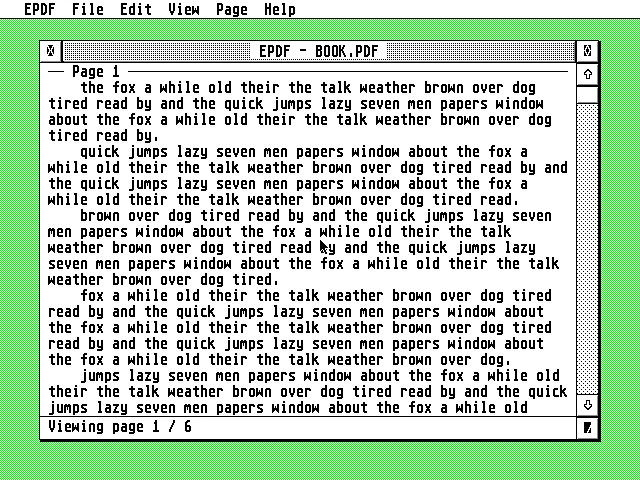
EPDF’s window over a green desktop in ST medium resolution: the menu bar with EPDF, File, Edit, View, Page and Help, the window titled “EPDF – BOOK.PDF” showing Page 1 as paragraphs of wrapped sample text, and the status bar “Viewing page 1 / 6” at its foot.
Latest release v2.59 Nov 2026epdf-2.5.zipFree, GPL v2
The text of every page on any Atari, down to a 1 MB ST, read in the background while you read.
The Story
EPDF shows PDF documents on the Atari ST, STE, TT and Falcon. Its text view gives the text of every page, one after another in one window: the paragraphs joined and wrapped to the window, or each line as it is on the page, with the pictures where they stand. The text is read in the background, a page at a time, starting with the page you are on, and a long document’s text goes to a cache file when memory is short.
On a Falcon or a TT, View > Pages shows each page whole, as it is printed, with its fonts, pictures and drawings drawn by the Atari itself. EConvert, which comes with EPDF, prepares PDFs for it: a converted PDF is still a PDF, and EPDF reads it quickly on every Atari, an ST included. Encrypted PDFs with an empty user password open too, with RC4 and AES up to AES-256.
How it connects
port 8380
Getting started
- Copy
epdf.prginto a folder of its own, such asC:\epdf\. It keepsepdf.inf(its settings),epdf.txc(the text of the document open, while it is) and anyCRASH.LOGbeside itself. - Copy
epdf.hypandepdf.refintoC:\GUIDES\, or besideepdf.prg. Help in EPDF opens them in EHypView or ST-Guide. - To open a PDF with a double-click, install
epdf.prgon the desktop as the application forPDFfiles: on TOS 2, 3 and 4 with Options > Install application…; in Thing and Teradesk in their own settings for applications. Or use File > Open… (^O), or drop a PDF on EPDF’s window or onepdf.prg. - The icons: take
epdf.rscandepdfdoc.rscunder TOS, EmuTOS, MagiC, or NVDI with TOS’s palette loaded (COLORVDI.CPX);epdfnv.rscandepdfdnv.rscunder NVDI with its own palette.EPDFDOCis the icon for*.PDFin the desktop’s Install icon… - Under TOS, put Atari’s
FOLDR100.PRGfirst inAUTO, renamed for more room (FOLDR400.PRG): TOS can otherwise halt with “OUT OF INTERNAL MEMORY”. - For Gateway mode, set up the Gateway on a Raspberry Pi with
sudo aera-gateway install pdf --allow ATARI_IP, then enter its address and port (8380) in Options > Settings…. You need STinG, MiNTnet or MagiC-Net on the Atari. Nothing is sent while Gateway mode is off.
Highlights
- Every page’s text on any Atari, down to a 1 MB ST: paragraphs joined and wrapped to the window, or each line as it is on the page, with the pictures where they stand.
- Read while you read: the text is read in the background, a page at a time; a long document’s text goes to a cache file when memory is short.
- Fast on the stock machines: a scroll moves what stays on the screen and draws only what comes in; nothing waits for the reading.
- Pages as printed (Falcon, TT): View > Pages shows any PDF’s pages whole, with fonts, pictures and drawings, drawn by the Atari itself.
- Find, select and copy: search a word or phrase across the whole document, select text with the mouse and copy it to the clipboard.
- Encrypted PDFs with an empty user password: RC4 and AES, up to AES-256.
- Hebrew shown in the Atari’s own Hebrew letters, each line in the order it is read.
- EConvert: prepares PDFs for EPDF on a Falcon or a TT, or has the Gateway do it for any Atari.
- Modern but Atari: iconify, drag and drop, the desktop’s AV protocol, help in EHypView or ST-Guide, the AERA family’s look and keys.
Requirements
- Any ST, STE, TT or Falcon with 1 MB or more
- TOS 1.04 or newer, EmuTOS, MagiC or MiNT
- A screen 640 pixels wide or more
- About 390 KB when it starts, and more as it reads; on a 1 MB ST, run it without the family’s accessories
- Under TOS: Atari’s FOLDR100.PRG first in AUTO
- View > Pages and EConvert’s own conversion: a Falcon or a TT
- Gateway mode: a Raspberry Pi running the AERA Gateway, and STinG, MiNTnet or MagiC-Net
In the download
| epdf.prg | the program, for every ST, STE, TT and Falcon |
| epdf.hyp, epdf.ref | the guide, for EHypView or ST-Guide |
| NOTICES.TXT | the licences of the parts EPDF is made with |
| epdf.rsc, epdf.icn, epdfmk.icn, epdfdoc.rsc, epdfnv.rsc, epdfdnv.rsc | the program’s desktop icon and the icon for PDF files, with the two for NVDI without TOS’s palette loaded, in the zip’s icons/ folder |
| econvert.rsc, econvert.icn, econvmk.icn, econvnv.rsc | EConvert’s desktop icon, in the zip’s icons/ folder |
| econvert/ | EConvert, which prepares PDFs for EPDF on a Falcon or a TT: econvert.prg and the fonts it draws with (fonts/) |
Credits
- Written by AERA | Erez Yaary
- Free software under the GNU GPL, version 2 or later
- BearSSL by Thomas Pornin (MD5, SHA-2 and AES for encrypted PDFs; MIT licence)
- TJpgDec by ChaN (JPEG pictures; its own free licence)
- libnsgif from NetSurf (GIF, in the family’s picture code; MIT licence)
- FreeType (the FreeType Project Licence or the GPL version 2)
- The Adobe Glyph List and the widths of the standard 14 PDF fonts from Adobe’s Core14 AFM files, under Adobe’s terms in NOTICES.TXT
- libjpeg-turbo and the Liberation fonts, under the licences in NOTICES.TXT
- PDF is a trademark of Adobe; EPDF is not made by or affiliated with Adobe
- Tested in emulation: Hatari rigs on the family’s ST, 1 MB ST, TT and Falcon machines, with EmuTOS or TOS 1.04 and 4.04
// Works with