
// Software // Atari ST
EFTP
A two-pane FTP program for the Atari ST, STE, TT and Falcon, written in C for GEM, that reaches FTPS and SFTP servers too.

- ST
- STE
- TT
- Falcon
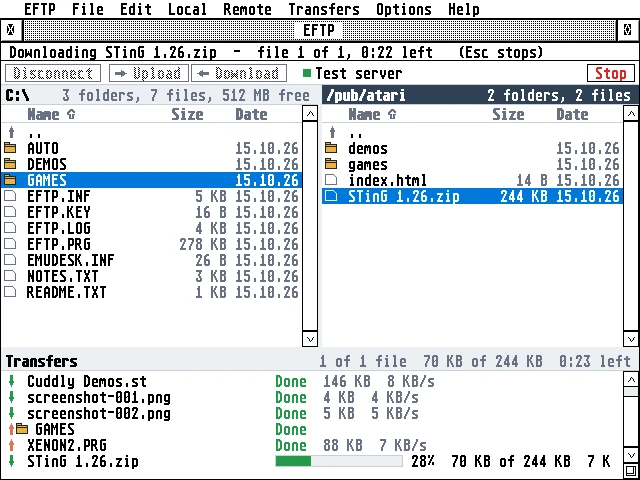
Two panes: the Atari’s C:\ on the left, the server’s /pub/atari on the right, and the transfer queue below, with STinG 1.26.zip downloading at 28% and the earlier files Done in green.
Latest release v1.4521 Oct 2026EFTP-1.45.zipFree, GPL v2
Two panes like FileZilla, whole folders both ways and transfers that resume, on any Atari from a 1 MB ST to a Falcon.
The Story
EFTP shows the Atari’s files on the left and the server’s on the right, with the transfers below. Files and whole folders go across by drag and drop, a double-click or the toolbar, and a queue shows the progress, the speed and the time left. A stopped or dropped transfer goes on where it stopped, and long names come down as 8+3 names TOS can take, always the same for the same folder.
Plain FTP goes straight to the server from any Atari. For FTPS and SFTP, an ST or STE goes through eftpgate.py on a Raspberry Pi, while a Falcon or TT can do FTPS itself with TLS 1.2 and RSA on the DSP. The ST edition, EFTPST.PRG, is about 180 KB of plain 68000 code and runs on a 1 MB ST with STinG.
How it connects
plain FTP
Getting started
- Copy
EFTP.PRGorEFTPST.PRGinto any folder, withEFTP.HYP; for Falcon mode,CACERT.PEMandROOTS.DATtoo. EFTP keeps its settings (EFTP.INF,EFTP.KEY) in the folder it is started from, so one of its own keeps them together. To update, copy a new release’s files over these; the settings stay. - Load STinG (or run MiNT with MiNTnet).
- Start EFTP, choose File > Sites (^K), make a site with the server’s name and your login, and press Connect. Afterwards Connect in the toolbar lists your sites: one click connects.
- Press Help in EFTP for the guide.
Highlights
- Two panes, like FileZilla: the Atari’s files on the left, the server’s on the right, the transfers below.
- Whole folders, both ways, listed all the way down before the first file, so the count is complete from the start.
- Drag and drop from one side to the other, or double-click, or Upload and Download in the toolbar.
- Resume: Stop and Retry go on where a file stopped; when the line drops, EFTP connects again by itself.
- Names TOS can take: long names come down as 8+3, always the same for the same folder.
- Secure servers: FTPS and SFTP through a Raspberry Pi; FTPS by a Falcon or TT itself, with RSA on the DSP.
- Site Manager with your servers, logins and start folders; Quick connect for the others.
- Small and quick: the ST edition is about 180 KB of 68000 code and runs on a 1 MB ST with STinG.
Requirements
- TOS 1.04 or newer (TOS 4 on the Falcon), EmuTOS, MagiC or MiNT
- 640 by 200 (ST medium) or larger
- Free memory: about 350 KB for EFTPST.PRG, about 500 KB for EFTP.PRG with Falcon mode
- STinG (or STiK), MiNTnet or MagiC-Net
- Falcon mode: a Falcon or TT
In the download
| EFTP.PRG | Falcon and TT: with Falcon mode (TLS, DSP); also works through the Pi |
| EFTPST.PRG | ST and STE: the same program without TLS, about 105 KB smaller, through the Pi |
| CACERT.PEM, ROOTS.DAT | the root certificates for Falcon mode |
| EFTP.HYP | the guide, for EHypView or ST-Guide, opened by the Help key |
| icons/ | EFTP’s desktop icon |
Credits
- Written by AERA | Erez Yaary
- Free software under the GNU GPL, version 2 or later
- TLS by BearSSL (Thomas Pornin, MIT licence)
- SFTP in the Pi gateway by paramiko (LGPL 2.1)
- Tested on hardware: Atari 1040 ST (4 MB) and Falcon030 with DFB1
- Tested in emulation: ST (1 MB and 4 MB), TT030 and Falcon030, with TOS 1.04, 3.06, 4.04 and EmuTOS
// Works with