
// Software // Atari ST
ECal
A calendar for the Atari ST, STE, TT and Falcon: a GEM desk accessory that syncs with iCloud and any CalDAV server.

- ST
- STE
- TT
- Falcon
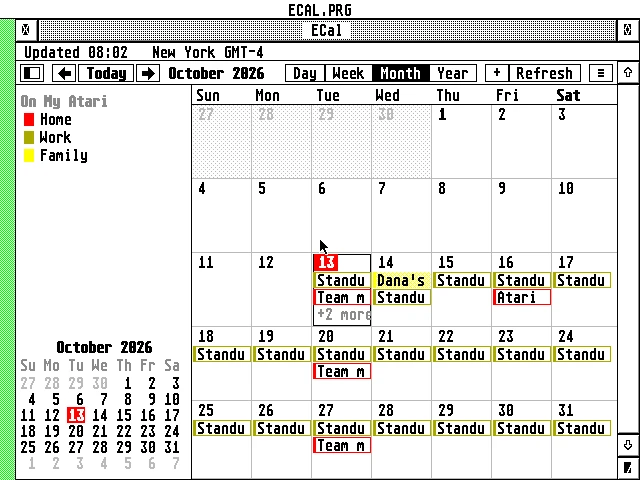
Month view: October 2026, with the Home, Work and Family calendars in red, olive and yellow, today (the 13th) in red, and the calendar list and a small month on the left.
Latest release v2.2121 Oct 2026ECAL-2.21.zipFree, GPL v2
Day, week, month and year views, two-way iCloud sync and reminders over any program, in the Desk menu of a computer from 1985.
The Story
ECal waits in the Desk menu like any GEM accessory, so it opens over whatever program you are working in. Behind it is a full CalDAV client: iCloud and other calendars sync both ways, .ics subscriptions refresh on a schedule, and calendars kept only on the Atari sit next to them, each in its own colour.
It is built for the machines it runs on. A Falcon or TT makes its own TLS 1.2 connections, with the DSP56001 checking each server’s RSA signature in about a tenth of a second. An ST or STE hands that work to a Raspberry Pi on the home network. Hebrew runs throughout, from right-to-left titles to Hebrew dates and Hebrew-calendar repeats.
How it connects
plain HTTP
Getting started
- Copy
ECAL.ACC(Falcon, TT) orECALST.ACC(ST, STE; renamed toECAL.ACCor not) to the root of your boot drive, e.g.C:\. - For Falcon mode, make a folder
C:\ECALand putCACERT.PEMandROOTS.DATin it. ECal keeps its own files there too. StartECAL.PRGfrom the folder once, or show the accessory where it is when it asks. - On an ST or STE, set up the AERA Gateway on a Raspberry Pi:
sudo gateway/aera-gateway install dav. It prints the address to type into ECal. - Reboot and choose ECal in the Desk menu. In Settings, under Connection, type the Pi’s IP address and port 8180 into Pi gateway, or on a Falcon or TT tick Falcon mode. Under Time zones, set the zone the Atari’s clock is in.
- Add your iCloud account with Add account or calendar… and an app-specific password; your Apple ID’s own password won’t work.
- Copy
ECAL.HYPandECAL.REFnext to ECal or into your help folder (e.g.C:\GUIDES\), and press Help in ECal for the guide.
Highlights
- Like the Mac’s Calendar: day, week, month and year views, each calendar in its own colour.
- Two-way sync with iCloud, Fastmail, Nextcloud, Synology and any CalDAV server.
- Every repeat in RFC 5545, with “only this one” or “all future ones” edits.
- Invitations by name from EContact; iCloud sends them and keeps the answers.
- Reminders pop up over any program, even with the window closed.
- Hebrew titles right to left, the Israeli keyboard on F10, and Hebrew dates.
- Works offline from its own copy on disk, and syncs in the background when idle.
- Uses the machine: TT RAM, GDOS fonts, right-click menus, drag and drop.
Requirements
- TOS 1.04 to 4.x, EmuTOS, MagiC or MiNT
- ST medium, ST high, TT or Falcon resolution
- 1 MB of RAM; 2 MB or more for big calendars
- STinG or MiNTnet
- ST and STE: a Raspberry Pi running the AERA Gateway
In the download
| ECAL.ACC | Falcon and TT: the desk accessory with Falcon mode (TLS, DSP); also works through the Pi |
| ECALST.ACC | ST and STE: the same accessory without TLS, about 105 KB smaller, through the Pi |
| ECAL.PRG | the same as ECAL.ACC, to start from the desktop, with a menu bar |
| CACERT.PEM, ROOTS.DAT | the root certificates for Falcon mode |
| ECAL.HYP, ECAL.REF | the guide, for EHypView, ST-Guide or HypView, opened by the Help key |
| icons/ | ECal’s desktop icon, black and white and 16 colours |
Credits
- Written by AERA | Erez Yaary
- Free software under the GNU GPL, version 2 or later
- TLS by BearSSL (Thomas Pornin, MIT licence)
- Tested on hardware: Atari 1040 ST (4 MB) and Falcon030 with DFB1
- Tested in emulation: ST (1 MB and 4 MB), TT030 and Falcon030, with TOS 1.04, 3.06, 4.04 and EmuTOS
// Works with