
// Software // Atari XL
EFTP_XL
File transfer for 8-bit Atari computers (400, 800, XL, XE) over FujiNet, written in 6502 assembly for Mac/65, so it can be built on the Atari as well.
- 400
- 800
- XL
- XE
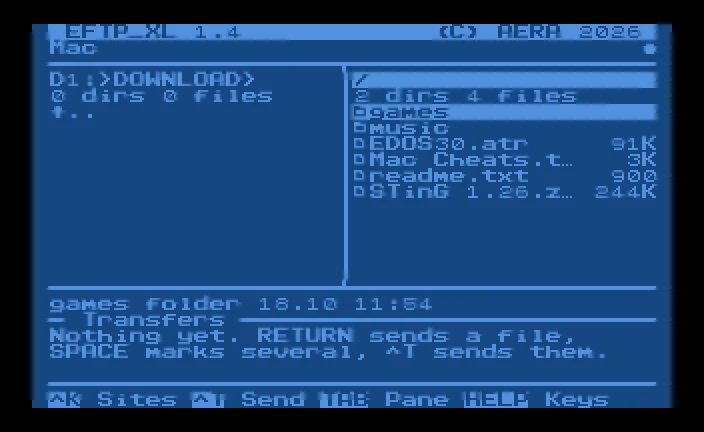
Connected to the site Mac: the Atari’s empty D1:>DOWNLOAD> folder on the left, the server’s folder on the right with games, music and four files, and the transfers area saying Nothing yet.
Latest release v1.518 Oct 2026Free, GPL v2
The Atari on the left, the server on the right, and files and whole folders moved both ways over FujiNet.
The Story
EFTP_XL brings the screen of EFTP on the ST to the 8-bit Atari: the drives D1: to D8: and SpartaDOS folders on the left, the server on the right, and the transfers below with a progress bar and the speed. It has its own FTP client over plain FujiNet TCP connections, so it logs in with your own user and password on firmware 1.3 and later.
SSH and TLS are far beyond a 6502, so for SFTP and FTPS servers it goes through eftpgate on a Raspberry Pi at home, the same gateway EFTP uses on the ST. The program is 15.1K of Mac/65 source, and EFTPXL.ATR carries the sources so it can be built on the Atari itself.
How it connects
plain FTP
plain FTP
Getting started
- Get
EFTPXL.PRGandAERA.FNTfrom the latest release onto a disk the Atari can read, e.g. an ATR on the FujiNet SD card or a TNFS share.EFTPXL.ATR, also in the release, is a bootable SpartaDOS 3.2 disk with both on it (and the sources). - Load it: L from the DOS 2.5 menu, or type
EFTPXL.PRGat the SpartaDOS prompt. EFTP_XL looks forAERA.FNTand its sites (EFTPXL.CFG) onD:, the DOS’s current drive and folder, not where the program was loaded from: on DOS 2.5 that is always D1:, on SpartaDOS the drive and folder of the prompt. - Press ^K for the sites, ^N to add one: a name, the server (IP address or name), the port (blank: 21, or 22 for SFTP), your user (blank:
anonymous), the password (blank: asked for each time you connect), the folder on the server to start in (blank: the one the server logs you in to), the folder on the Atari (e.g.D1:>DOWNLOAD>; blank: the one shown), how files are sent and the Protocol: FTP, or SFTP or FTPS through the Pi gateway. A name holds up to 15 characters, the server 31, the user and the password 19 each, the server’s folder 39 and the Atari’s 23. RETURN on a site connects.
Highlights
- Any FTP server: log in with your user and password, over FujiNet.
- SFTP and FTPS servers on the internet too, through the AERA Pi gateway.
- Two panes: the Atari (D1: to D8:, SpartaDOS folders) and the server.
- Files and folders both ways, marked ones one after the other, with progress, speed and ESC to stop; text line ends changed when you want.
- New folder, rename, delete, on both sides.
- Sites saved on the disk, in
EFTPXL.CFG. - RESET comes back to the main screen, disconnected, never to DOS.
- DOS 2.5 and SpartaDOS 3.x: all file access goes through CIO, so any CIO-compatible DOS should work.
Requirements
- An Atari 400, 800, XL or XE
- FujiNet, firmware 1.3 or later
- DOS 2.5 or SpartaDOS 3.x; folders need SpartaDOS
- An FTP server with passive mode, e.g. pure-ftpd or pyftpdlib
- For SFTP and FTPS: a Raspberry Pi running eftpgate from AERA-Gateway
In the download
| EFTPXL.PRG | the program |
| AERA.FNT | the font the AERA 8-bit programs share; keep it on D: with the program |
| EFTPXL.ATR | a bootable SpartaDOS 3.2 disk with the program, the font and the sources |
| EFTPTEST.ATR | a bootable test disk with the files to send and TESTPLAN.TXT, the test plan |
Credits
- Written by AERA | Erez Yaary
- Free software under the GNU GPL, version 2 or later
- EFTPXL.ATR carries SpartaDOS 3.2 and its boot sectors, under their own terms
- Tested on hardware: Atari 1200XL with two 1050 drives, SpartaDOS 3.2 and FujiNet (firmware 1.3 or later)
- Tested in emulation: atari800 with SpartaDOS 3.2 and MAC/65 1.01, and 82 checks on an emulated 6502 against an FTP server, and SFTP and FTPS through eftpgate
// Works with