
// Software // Atari XL
EDOS
A menu-driven Disk Utility Package for Atari 8-bit computers, written in 6502 assembly with MAC/65, running on top of MyDOS, SpartaDOS or DOS 2.5.
- 400
- 800
- XL
- XE
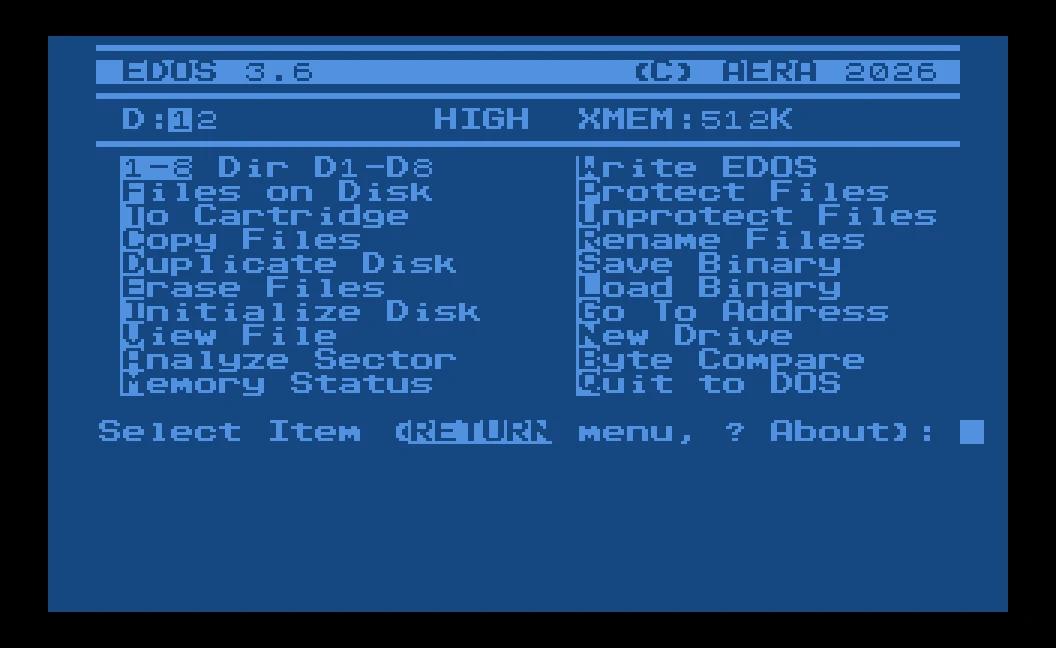
The EDOS 3.6 main menu in light blue on dark blue: drives 1 and 2 with drive 1 current, HIGH and XMEM:512K on the status line, the twenty commands in two columns with their keys in inverse, and the prompt Select Item (RETURN menu, ? About).
Latest release v3.719 Oct 2026Free, GPL v2
Every disk job one key from the menu, in a program of about 7.3K that looks and behaves alike on MyDOS, SpartaDOS and DOS 2.5.
The Story
EDOS puts every disk job on one screen: directory, copy, duplicate, erase, rename, protect, format, binary load and save, and compare, each one key from the menu. It works through CIO and SIO rather than a DOS’s own calls, so it is the same on MyDOS, SpartaDOS and DOS 2.5. The border turns green while it reads and red before anything is written or erased.
It began as a Disk Utility Package in a school coding notebook, after a first Atari, a 600XL, in 1984. Years later the notebook turned up again, and the project was finished on a 1200XL with two 1050 drives and a MAC/65 cartridge. The MAC/65 sources are on EDOS.ATR, so EDOS still assembles on the Atari.
Getting started
- Boot
EDOS.ATRand typeEDOSat the SpartaDOS prompt. - Or copy
EDOS.COMandAERA.FNTto your own DOS disk and loadEDOS.COM(L in the DOS 2.5 or MyDOS menu,EDOSat the SpartaDOS prompt). On DOS 2.5 and MyDOS, EDOS can also take the place ofDUP.SYS: copyEDOS.COMto the DOS disk asDUP.SYS. - Press N to pick your drive, then any command’s key.
Highlights
- Every disk job on one screen: directory, copy, duplicate, erase, rename, protect, format, binary load and save, compare, each one key from the menu.
- The same on any DOS: EDOS works through CIO and SIO, so it looks and behaves alike on MyDOS, SpartaDOS and DOS 2.5.
- Big copies in one pass: Copy Files and Duplicate Disk go through the extended memory of an expanded XL or XE.
- Fast disk copies: when a drive has its own fast SIO code, Duplicate Disk reads it from the drive and uses it.
- Colour shows what’s happening: green while reading, red before anything is written or erased.
- Sectors and memory too: view any file, sector or memory address 128 bytes at a time.
- Small:
EDOS.COMis about 7.3K. - Assembles on the Atari: the MAC/65 sources are on the disk; a PC cross assembler and tests are in the repository too.
Requirements
- An Atari 400, 800, XL or XE with 48K
- A disk drive
- MyDOS, SpartaDOS 3.x or DOS 2.5
- Free memory from $1E00 to $8000; any 48K Atari has room
- For Copy Files and Duplicate Disk: 130XE-style extended memory (a whole disk takes 96K to 192K)
In the download
| EDOS.ATR | a bootable SpartaDOS 3.2 disk with EDOS, its font and the current MAC/65 sources |
| EDOS.COM | the program: a binary load file for any DOS |
| AERA.FNT | the AERA family’s character set; keep it next to EDOS.COM |
| EDOSTEST.ATR | a bootable test disk with the test files and TESTPLAN.TXT, 46 checks for a real Atari |
Credits
- Written by AERA | Erez Yaary
- Free software under the GNU GPL, version 2 or later
- The disk images carry SpartaDOS and other DOS files, under their own authors’ terms
- Tested on hardware: Atari 1200XL with two 1050 drives, SpartaDOS 3.2 and MAC/65
- Tested in emulation: atari800 with SpartaDOS 3.2 and MAC/65 1.01, and every command on an emulated 6502 with 256K of banked memory
// Works with