// Software // Atari ST
EPlay
An audio player for the Atari Falcon, TT and STE, written in C and DSP56001 assembly for GEM: MP3 decoded on the Falcon's DSP, WAV and AIFF, and web radio.

- STE
- TT
- Falcon
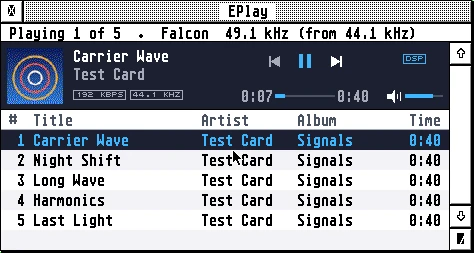
EPlay on a Falcon in 256 colours: the info line “Playing 1 of 5, Falcon 49.1 kHz (from 44.1 kHz)”, the bar with the round blue and orange album cover, “Carrier Wave” by Test Card, 192 KBPS, 44.1 KHZ and DSP badges, the previous, pause and next buttons, the position at 0:07 of 0:40 and the volume, and the list of five tracks from the album Signals, the first one highlighted.
Latest release v1.139 Nov 2026eplay-1.13.zipFree, GPL v2
The music is fed by an interrupt from a queue held in memory, so menus, dialogs and other programs don’t break it up.
The Story
EPlay plays music on the Atari Falcon, TT and STE in a GEM window. On the Falcon the whole MP3 decoder (MPEG-1, 2 and 2.5 layer III) runs on the DSP56001, and the DSP plays what it decodes itself. A file at a rate the Falcon’s clock hasn’t, such as 44.1 kHz on a stock Falcon, is resampled on the DSP and heard at its own pitch; with a SoundPool FDI on the DSP port, EPlay sets it to the file’s rate, as Cubase Audio does. WAV and AIFF play on the Falcon, on the TT’s 8-bit DMA sound, and on the STE with its own edition, eplayst.prg.
The music is fed by an interrupt from a queue of seconds to minutes held in memory, so menus, dialogs, the file selector and other programs don’t break it up, and an accelerated Falcon plays exactly as a stock one. It plays from a list of files, folders and M3U playlists, one after another. File > Open URL… plays a web radio station, Icecast or Shoutcast, with the songs’ titles in the bar: directly for MP3, or through the AERA Gateway for AAC, Ogg and HLS.
How it connects
port 8580
Getting started
- Copy
eplay.prginto a folder of its own, such asC:\EPLAY\. On an STE useeplayst.prg, the 68000’s edition. EPlay keeps its settings (EPLAY.INF), its log (EPLAY.LOG), the album art it has unpacked (cache\) and anyCRASH.LOGbeside itself. - Copy
eplay.hypandeplay.refintoC:\GUIDES\, or besideeplay.prg. Help in EPlay opens them in EHypView or ST-Guide. - Start EPlay and choose File > Open… (^O), or drop
.MP3,.WAVor.AIFfiles, a folder or an.M3Uplaylist on EPlay’s window or oneplay.prg. What you give goes into the list, and the first file plays. - Space plays and pauses; a click or a drag on the position bar goes to that place in the file; + and – set the volume, 3 dB a press.
- The icons: take
eplay.rscunder TOS, EmuTOS or MagiC, oreplaynv.rscunder NVDI with its own palette;eplay.icnandeplaymk.icnare for desktops that take them. - For web radio you need a network card and STinG or MiNTnet; with STinG, set the Delay in
STING.CPXto 10 on a Falcon. File > Open URL… (Shift+^O) takes a station’s address, or a.plsor.m3ustation list. For stations at https addresses copytls.ovlandCACERT.PEMbesideeplay.prg. - For Through the Gateway, choose it in the Options menu and enter the Gateway’s address and port in Settings. It is needed for stations that send AAC or Ogg, or HLS. Direct connection, the default, sends nothing to the Gateway.
Highlights
- Steady sound: the music is fed by an interrupt from a queue of seconds to minutes held in memory, so menus, dialogs, the file selector and other programs don’t break it up.
- MP3 on the DSP: the whole decoder runs on the Falcon’s DSP56001, checked bit for bit against a model that meets ISO 11172-4’s full accuracy; the 68030 only hands it the file’s frames.
- Through the FDI: with a SoundPool FDI on the DSP port, EPlay sets it to the file’s rate, 44.1 or 48 kHz, and the DSP plays into it on its clock.
- At its own pitch: an MP3 at a rate the clock hasn’t, or a WAV or AIFF at any rate below the DSP’s output, is resampled on the DSP.
- Gapless and ReplayGain: an album encoded with LAME plays from one track into the next with no gap, and ReplayGain evens out the loudness of tracks or albums from their tags.
- Web radio: Icecast and Shoutcast stations, http or https, with the songs’ titles and the station’s picture; direct for MP3, or through the AERA Gateway for AAC, Ogg and HLS.
- On a TT: WAV and AIFF on its 8-bit DMA sound, at 50 kHz for CD’s 44.1 kHz; MP3 files show dim and are passed over.
- On an STE: eplayst.prg, the 68000’s edition, plays WAV and AIFF on its 8-bit DMA sound, with the volume on the STE’s own control.
- Lists and playlists: files, folders and M3U playlists, Shuffle and Repeat, a mini player, and the album art, title and artist from the file’s tags.
Requirements
- Falcon030 with TOS 4.0x or EmuTOS: MP3 needs its DSP; WAV and AIFF its sound DMA
- Or a TT (WAV and AIFF), or an STE or Mega STE with eplayst.prg (WAV and AIFF)
- A screen 640 pixels wide or more
- MagiC and MiNT not tried yet
- Web radio: a Falcon with a network card (Ethernet) and STinG or MiNTnet
- Through the Gateway: a Raspberry Pi running the AERA Gateway
In the download
| eplay.prg | the program, for the Falcon and the TT |
| eplayst.prg | the program for an STE, the 68000’s edition |
| eplay.hyp, eplay.ref | the guide, for EHypView or ST-Guide |
| notices.txt | the licences of the parts EPlay is made with |
| eplay.rsc, eplay.icn, eplaymk.icn | the program’s desktop icon, in the zip’s icons/ folder |
Credits
- Written by AERA | Erez Yaary
- Free software under the GNU GPL, version 2 or later
- The MP3 standard’s Huffman codes and synthesis window as FFmpeg transcribes them (GNU LGPL 2.1 or later)
- The licences of the other parts are in notices.txt
- Tested in emulation: Hatari rigs on a Falcon with the DFB1 and on a stock Falcon, with the sound recorded and checked
// Works with