
// Software // Atari ST
EWeb
A web browser for the Atari Falcon and TT, written for GEM and tuned for a Falcon with a DFB1 accelerator; its ST edition runs on an ST or STE with 4 MB.

- ST
- STE
- TT
- Falcon
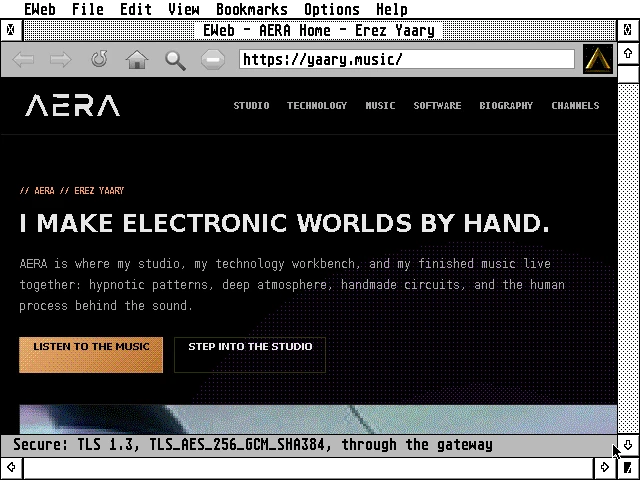
EWeb on a Falcon in 256 colours, showing yaary.music: the AERA home page with “I make electronic worlds by hand.” and its two buttons, and the status line saying the connection is secure, TLS 1.3 through the gateway.
Latest release v1.211 Nov 2026eweb-1.2.zipFree, GPL v2
TLS 1.2 on the Atari itself, the DSP doing the maths.
The Story
EWeb uses its own fast HTML, CSS and layout engines for modern pages: flexbox, grid, tables and frames. Pictures in JPEG, PNG, GIF, WebP and SVG are dithered to any screen, with JPEGs decoded on the DSP. There are logins, file uploads and cookies, and scripts run on the sites you choose.
A Falcon or TT reaches every site itself, with TLS 1.2 on the Atari and the DSP doing the maths. The ST edition needs AERA-Gateway for secure sites. The Gateway also translates pages into your language, and EWeb has several windows, bookmarks, history, find, saving, and a disk cache that brings pages back at once, even when their site can’t be reached.
How it connects
plain HTTP
Getting started
- Download the latest
eweb-x.y.zipand unpack it into a folder of its own. - With STinG or MiNTnet running, double-click
EWEB.PRG(EWEBST.PRGon an ST or STE). - Type an address and press Return, or pick a site from the home page.
- Press Help for the guide.
- Under TOS, put Atari’s
FOLDR100.PRGfirst inAUTO, renamedFOLDR400.PRG, so TOS doesn’t run out of folder memory. - With STinG, set the Delay in
STING.CPXto 10 on a Falcon or TT.
Highlights
- Modern pages: EWeb’s own fast HTML, CSS and layout engines: flexbox, grid, tables, frames.
- Pictures: JPEG, PNG, GIF, WebP and SVG, JPEGs decoded on the DSP, dithered to any screen.
- Forms and JavaScript: logins, file uploads, cookies; scripts on the sites you choose.
- Secure sites: TLS 1.2 on the Atari itself, the DSP doing the maths.
- Translation: pages translated into your language on your own Gateway.
- Hebrew: pages right to left in every Hebrew encoding, and typing Hebrew (F10).
- Browsing: several windows, search from the address bar, bookmarks, history, find, saving.
- A disk cache: pages come back at once, even when their site can’t be reached.
- Every screen: monochrome to the Falcon’s true colour, in EWeb’s own fonts.
- AERA family: the family’s menus, shortcuts, dialogs and help; mail links open EMail.
Requirements
- A Falcon or TT with about 3.5 MB free
- A screen 640 pixels wide
- TOS, EmuTOS or MagiC, with STinG or MiNTnet running
- For scripts: an FPU
- ST and STE: 4 MB, the ST edition (TOS 1.04 or newer) and the Gateway for secure sites
In the download
| eweb.prg | the browser, for the Falcon and TT |
| ewebst.prg | the ST edition, for an ST or STE |
| eweb.fnt | the fonts |
| ewebjs.ovl | JavaScript (needs an FPU) |
| tls.ovl, cacert.pem, roots.dat | secure connections made on the Atari |
| eweb.hyp | the guide (the Help key) |
| icons/ | the desktop icon |
Credits
- Written by AERA | Erez Yaary
- Free software under the GNU GPL, version 2 or later
- EWEB.FNT drawn from the DejaVu fonts (Bitstream Vera’s licence)
- NetSurf’s libraries, QuickJS, musl’s maths and BearSSL (MIT licence)
- libjpeg-turbo (IJG and BSD licences); TJpgDec (ChaN’s licence)
- CACERT.PEM is Mozilla’s (MPL 2.0)
- Tested on hardware: Falcon030 with DFB1
- Tested in emulation: Falcon030 (68030 at 32 MHz with the DSP, and the stock 4 MB Falcon), TT030 and a 4 MB 1040 ST, with TOS 4.04, 3.06 and 1.04, or EmuTOS
// Works with